Shopify Beautification of Product Inventory Progress Bar
A simple and elegant inventory progress bar that allows customers to easily see the current inventory status when browsing products. Through visual optimization, create a sense of urgency and significantly improve conversion rates and purchase intent.
Effect Preview
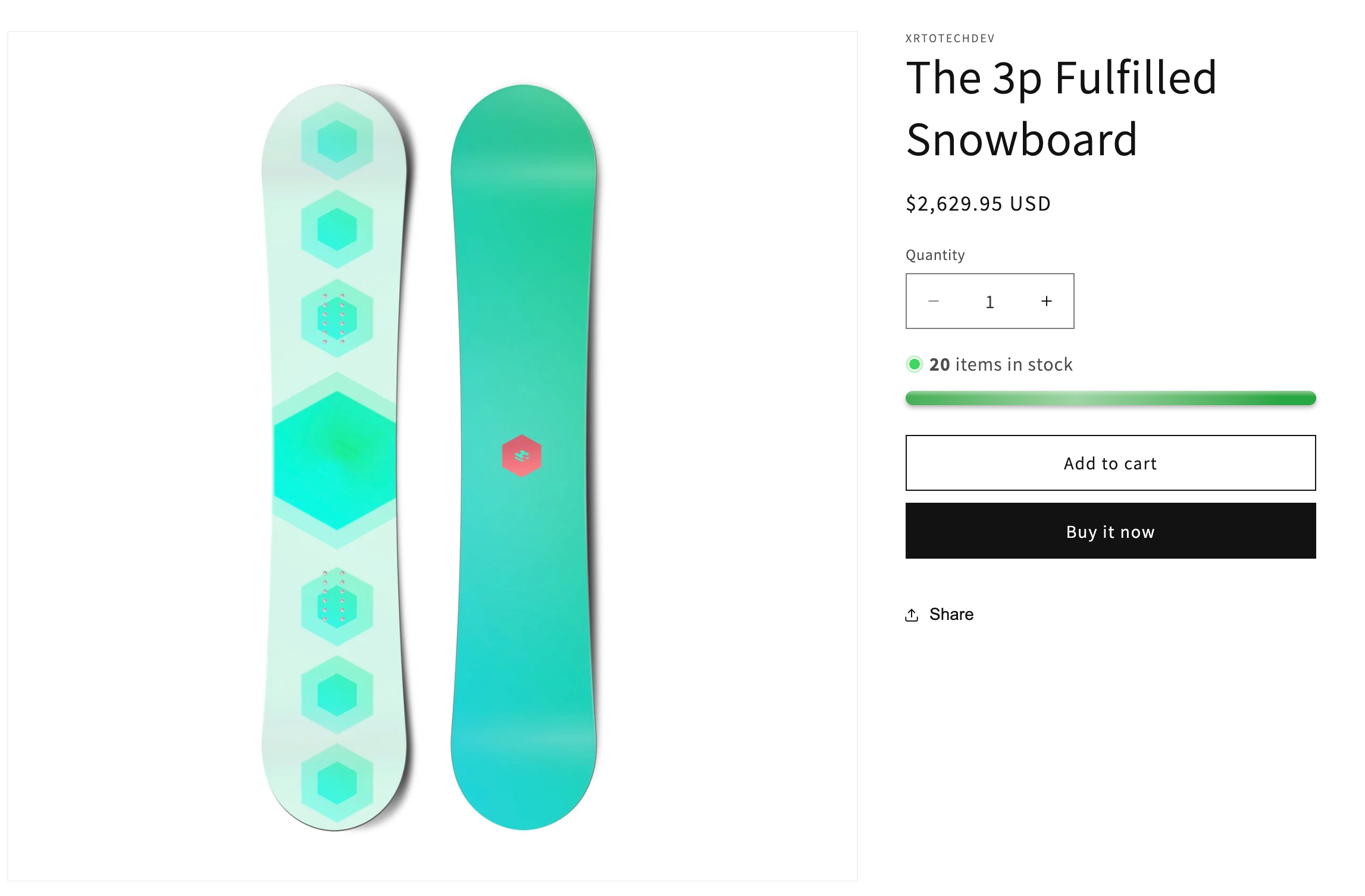
Desktop
- ✅ In Stock Status
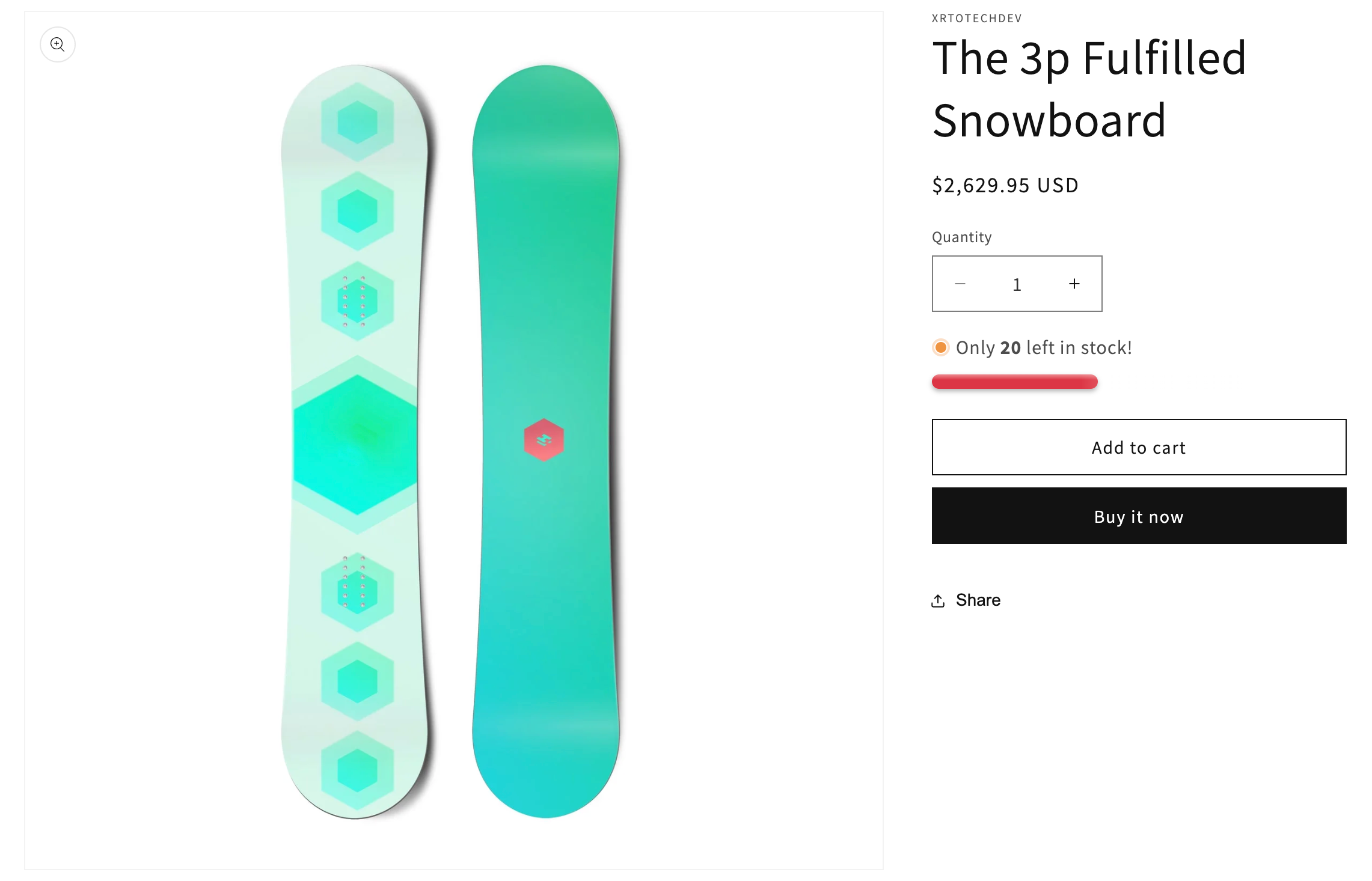
- ⚠️ Low Stock Status
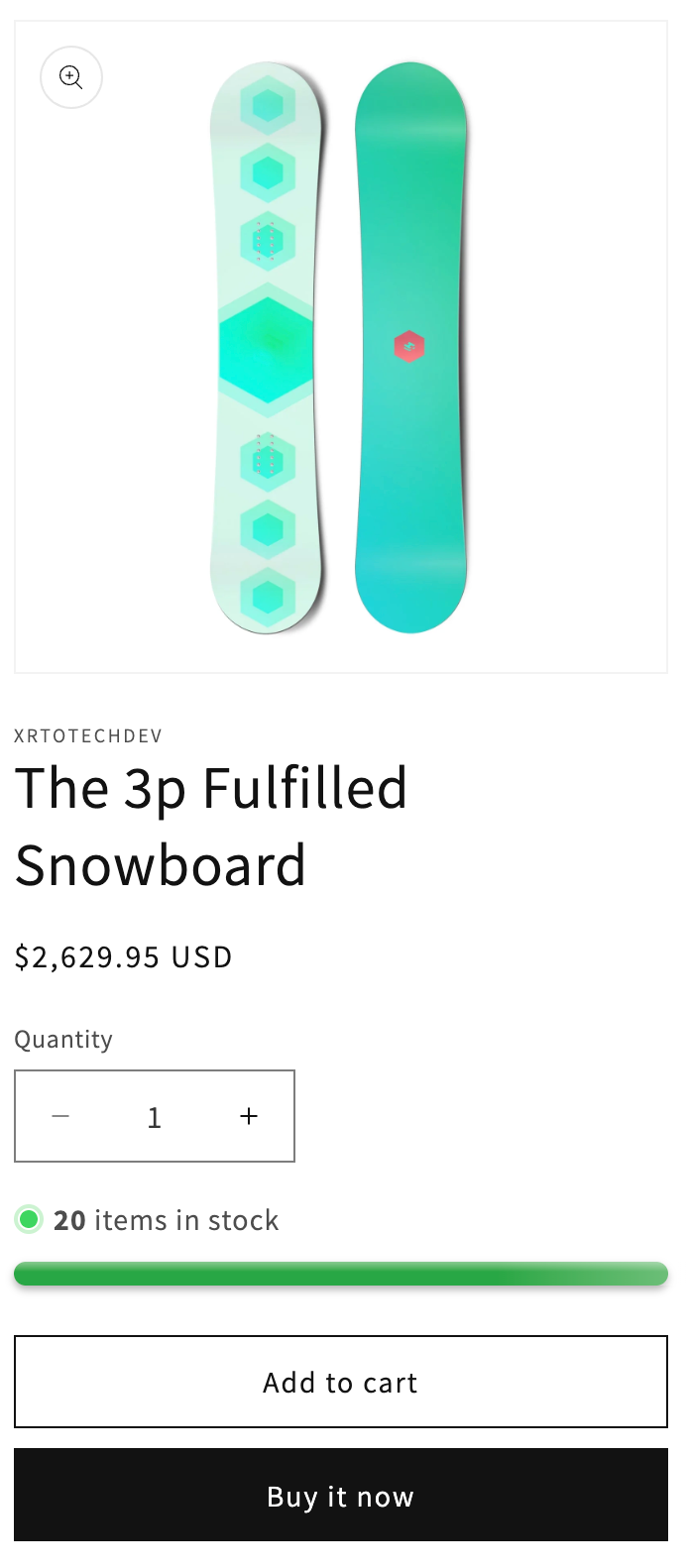
Mobile
- ✅ In Stock Status
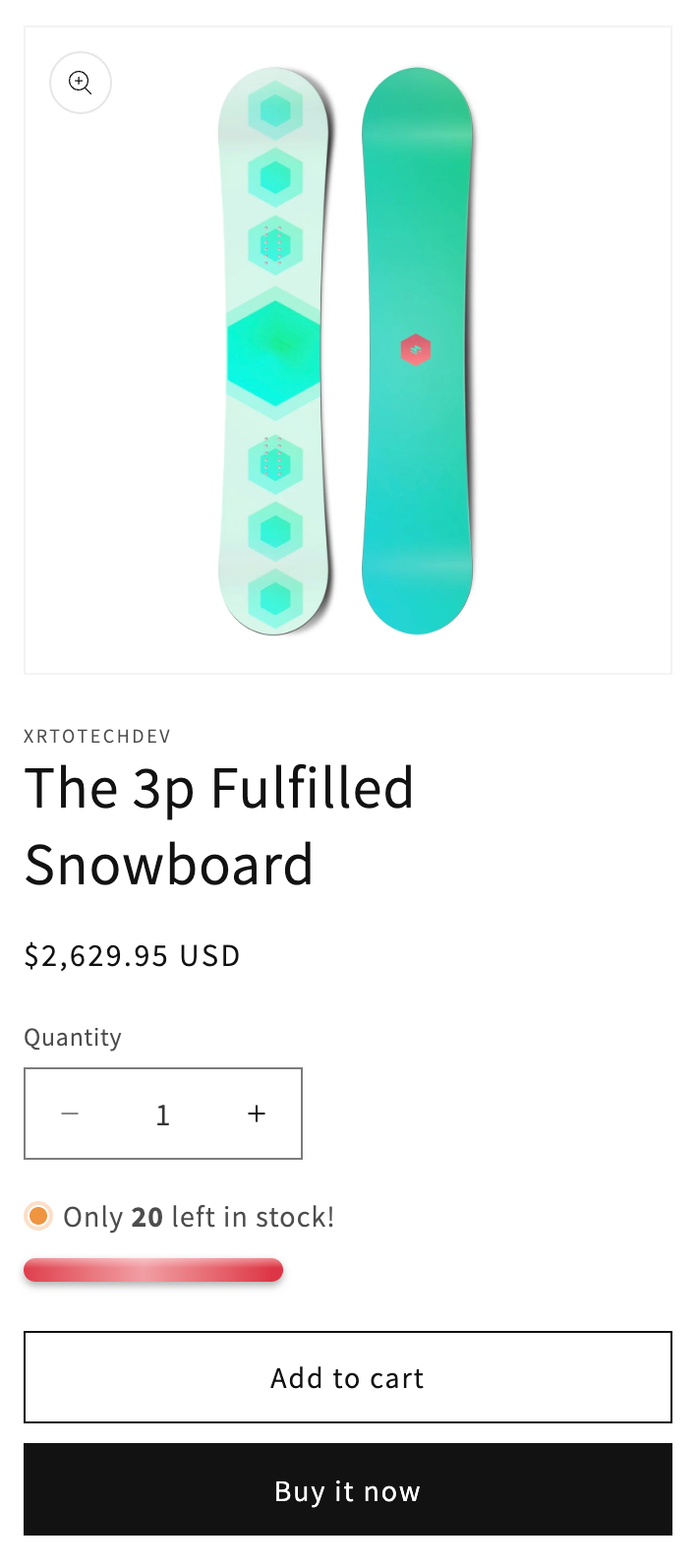
- ⚠️ Low Stock Status
Create CSS File
Create a component-inventory-progress.css file in the assets folder
/* Inventory Progress Bar Styles */

.product__inventory-wrapper {
  margin: 1rem 0;
  /* Adjust max-width to control the block width */
  max-width: 100%; /* Change to 80%, 500px, etc. to make the block narrower */
}

.product__inventory {
  display: flex;
  align-items: center;
  gap: 0.5rem;
  margin-bottom: 0.8rem;
}

/* Icon/dot size and color */
.product__inventory .svg-wrapper,
.product__inventory svg {
  width: 15px; /* Adjust dot size */
  height: 15px;
  flex-shrink: 0;
}

/* The dot color is controlled by inline styles in the liquid file:
   - In stock (green): rgb(62, 214, 96)
   - Low stock (orange): rgb(238, 148, 65)
   - Out of stock (gray): rgb(200, 200, 200)
   To change dot colors, modify the status_color values in main-product.liquid around line 677-691
*/

.product__inventory-text {
  flex: 1;
}

/* Inventory Progress Bar */
.product__inventory-progress {
  width: 100%; /* Change this to adjust progress bar width, e.g., 80%, 300px, etc. */
  max-width: 500px; /* Maximum width of progress bar */
  margin-top: 0.5rem;
}

.product__inventory-progress-bar {
  width: 100%;
  height: 12px !important; /* Change this to adjust progress bar height */
  background-color: transparent !important;
  border-radius: 10px;
  overflow: visible;
  position: relative;
  margin: 8px 0;
}

.product__inventory-progress-fill {
  height: 12px !important;
  border-radius: 10px;
  transition: width 0.6s ease;
  position: relative;
  display: block !important;
  /* No background or min-width set, fully controlled by inline styles */
}

/* Add glossy highlight effect */
.product__inventory-progress-fill::before {
  content: '';
  position: absolute;
  top: 0;
  left: 0;
  right: 0;
  height: 40%;
  background: linear-gradient(
    to bottom,
    rgba(255, 255, 255, 0.4) 0%,
    rgba(255, 255, 255, 0) 100%
  );
  border-radius: 10px 10px 0 0;
}

/* Add shimmer animation effect */
.product__inventory-progress-fill::after {
  content: '';
  position: absolute;
  top: 0;
  left: 0;
  right: 0;
  bottom: 0;
  background: linear-gradient(
    90deg,
    rgba(255, 255, 255, 0) 0%,
    rgba(255, 255, 255, 0.5) 50%,
    rgba(255, 255, 255, 0) 100%
  );
  animation: shimmer 3s infinite;
}

@keyframes shimmer {
  0% {
    transform: translateX(-100%);
  }
  100% {
    transform: translateX(100%);
  }
}

/* Responsive design */
@media screen and (max-width: 749px) {
  .product__inventory-progress-bar {
    height: 8px;
  }

  .product__inventory-progress-text {
    font-size: 1.1rem;
  }
}

/* Hide empty state */
.product__inventory-wrapper.visibility-hidden:empty {
  display: block;
}

.product__inventory-wrapper.visibility-hidden:empty::after {
  content: '#';
}
Create New Block
Find the main-product.liquid file
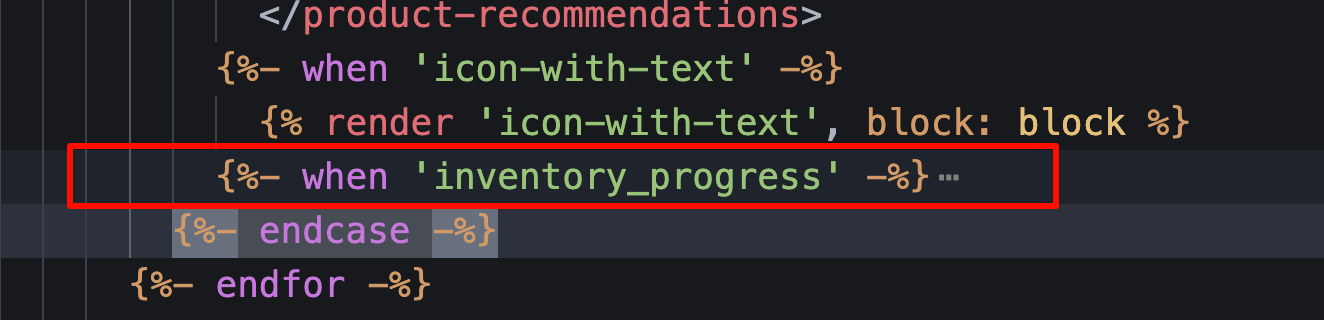
Search for {%- endcase -%}, and insert the following code above this line
          {%- when 'inventory_progress' -%}
            {{ 'component-inventory-progress.css' | asset_url | stylesheet_tag }}
            <div
              class="product__inventory-wrapper"
              {{ block.shopify_attributes }}
              id="InventoryProgress-{{ section.id }}"
            >
              {%- if product.selected_or_first_available_variant.inventory_management == 'shopify' -%}
                {%- assign current_inventory = product.selected_or_first_available_variant.inventory_quantity -%}
                {%- assign threshold = block.settings.low_stock_threshold | default: 5 -%}

                {%- if current_inventory > 0 -%}
                  {%- if current_inventory <= threshold -%}
                    {%- comment -%}Low stock warning: below threshold{%- endcomment -%}
                    {%- assign status_color = 'rgb(238, 148, 65)' -%}
                    {%- assign status_class = 'low-stock' -%}
                    {%- assign status_text = block.settings.low_stock_text | default: 'HURRY, ONLY {quantity} ITEMS LEFT IN STOCK!' -%}
                    {%- assign inventory_percentage = current_inventory | times: 100 | divided_by: threshold -%}
                  {%- else -%}
                    {%- comment -%}In stock: above threshold{%- endcomment -%}
                    {%- assign status_color = 'rgb(62, 214, 96)' -%}
                    {%- assign status_class = 'in-stock' -%}
                    {%- assign status_text = block.settings.in_stock_text | default: 'IN STOCK - {quantity} AVAILABLE' -%}
                    {%- assign inventory_percentage = 100 -%}
                  {%- endif -%}
                {%- else -%}
                  {%- assign status_color = 'rgb(200, 200, 200)' -%}
                  {%- assign status_class = 'out-of-stock' -%}
                  {%- assign status_text = block.settings.out_of_stock_text | default: 'OUT OF STOCK' -%}
                  {%- assign inventory_percentage = 0 -%}
                {%- endif -%}

                <div class="product__inventory {{ status_class }}">
                  <span class="svg-wrapper" style="color: {{ status_color }}">
                    {{- 'icon-inventory-status.svg' | inline_asset_content -}}
                  </span>
                  <div class="product__inventory-text">
                    {%- if block.settings.show_label -%}
                      {{ block.settings.label }}
                    {%- endif -%}
                    {%- assign quantity_placeholder = '{quantity}' -%}
                    {%- assign bold_quantity = '<strong>' | append: current_inventory | append: '</strong>' -%}
                    {{ status_text | replace: quantity_placeholder, bold_quantity }}
                  </div>
                </div>

                {%- if current_inventory > 0 -%}
                  <!-- Debug: Inventory={{ current_inventory }}, Threshold={{ threshold }}, Percentage={{ inventory_percentage }}% -->
                  <div class="product__inventory-progress" style="width: 100%; position: relative; height: 12px; margin: 8px 0;">
                    {%- if current_inventory <= threshold -%}
                      {%- comment -%}Low stock: red progress bar showing inventory ratio to threshold{%- endcomment -%}
                      <div
                        class="product__inventory-progress-fill"
                        style="width: {{ inventory_percentage }}% !important; height: 12px !important; background: #dc3545 !important; border-radius: 10px; box-shadow: 0 2px 4px rgba(0,0,0,0.3);"
                        data-percentage="{{ inventory_percentage }}"
                        data-inventory="{{ current_inventory }}"
                        data-threshold="{{ threshold }}"
                      ></div>
                    {%- else -%}
                      {%- comment -%}In stock: full green progress bar{%- endcomment -%}
                      <div
                        class="product__inventory-progress-fill"
                        style="width: 100% !important; height: 12px !important; background: #28a745 !important; border-radius: 10px; box-shadow: 0 2px 4px rgba(0,0,0,0.3);"
                        data-percentage="100"
                        data-inventory="{{ current_inventory }}"
                        data-threshold="{{ threshold }}"
                      ></div>
                    {%- endif -%}
                  </div>
                {%- endif -%}
              {%- endif -%}
            </div>
Search for inline_richtext, and insert the following schema code between } and ]
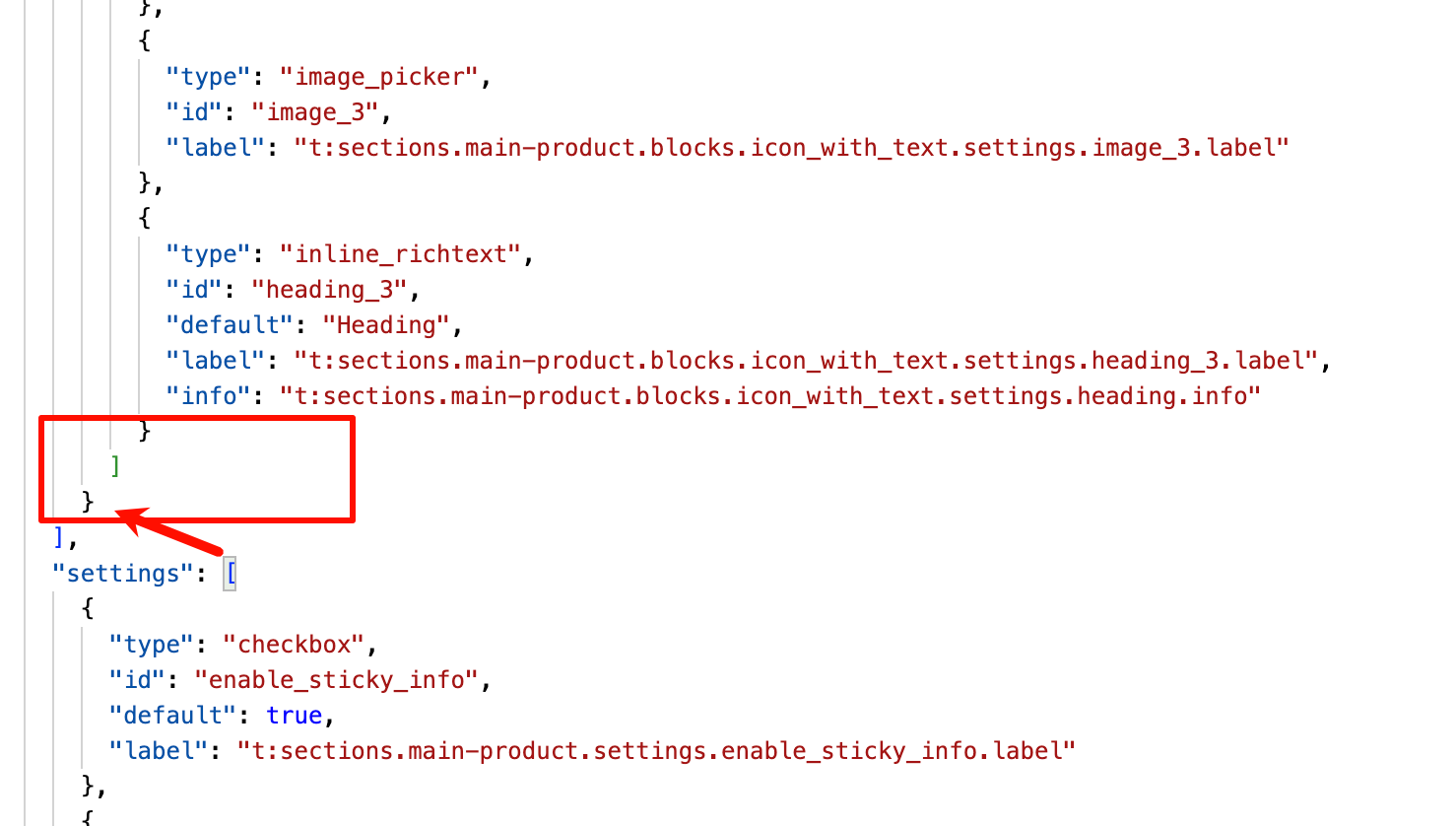
    {
      "type": "inventory_progress",
      "name": "Inventory Progress Bar",
      "limit": 1,
      "settings": [
        {
          "type": "header",
          "content": "Basic Settings"
        },
        {
          "type": "checkbox",
          "id": "show_label",
          "label": "Show Label",
          "default": true
        },
        {
          "type": "text",
          "id": "label",
          "label": "Label Text",
          "default": "Availability",
          "info": "Label displayed above the inventory status"
        },
        {
          "type": "header",
          "content": "Progress Bar Settings"
        },
        {
          "type": "range",
          "id": "low_stock_threshold",
          "min": 3,
          "max": 10,
          "step": 1,
          "label": "Low Stock Threshold",
          "default": 5,
          "info": "When inventory is below this number, it will show the low stock message"
        },
        {
          "type": "header",
          "content": "Text Customization"
        },
        {
          "type": "text",
          "id": "in_stock_text",
          "label": "In Stock Text",
          "default": "{quantity} items in stock",
          "info": "Use {quantity} to show the actual inventory count"
        },
        {
          "type": "text",
          "id": "low_stock_text",
          "label": "Low Stock Text",
          "default": "Only {quantity} left in stock!",
          "info": "Use {quantity} to show the actual inventory count"
        },
        {
          "type": "text",
          "id": "out_of_stock_text",
          "label": "Out of Stock Text",
          "default": "Out of stock"
        }
      ]
    }
Features & Settings Description
- Show Label:Control whether to display the inventory status label (e.g., "In Stock: {quantity}").
- Low Stock Threshold:Automatically display an alert when inventory is below this number, stimulating the customer's "rush purchase" desire.
- Text Customization:Customize the inventory status text,
{quantity}will be automatically replaced with the current inventory count.
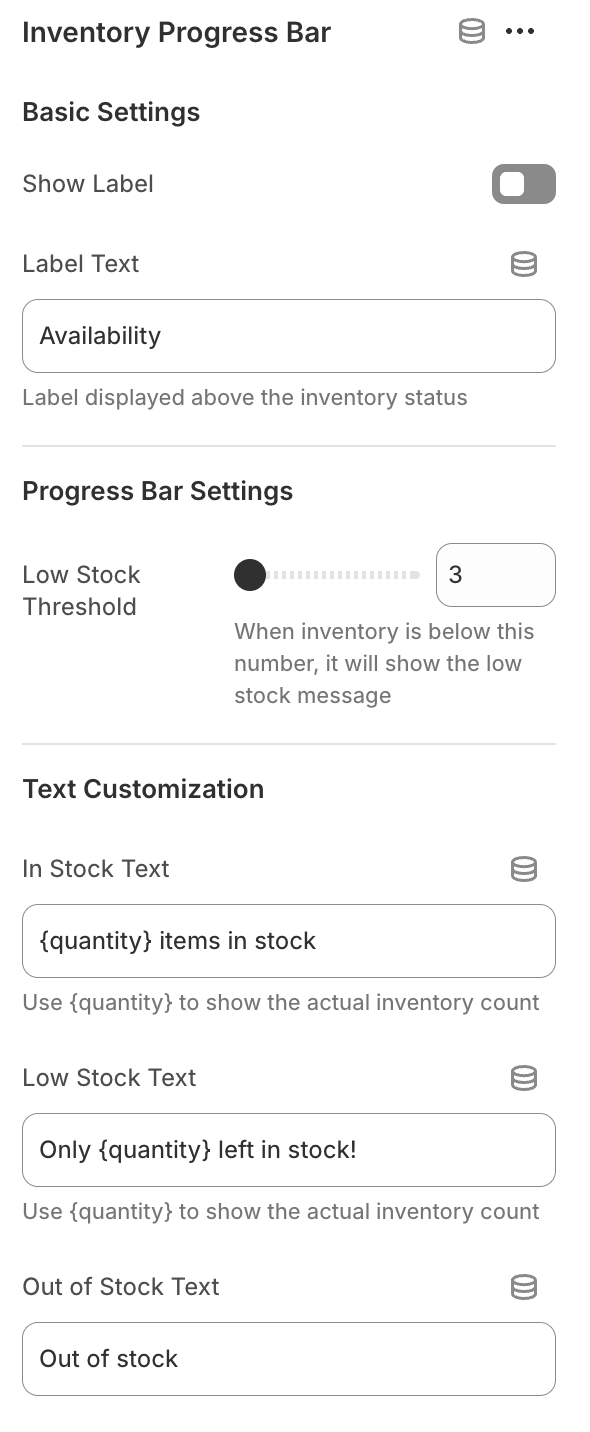
Configuration example:
- “In Stock: {quantity}”
- “Only {quantity} left, hurry up!”
- “Sorry, this product is sold out”
Advanced Usage Tips
- Flexibly adjust the exclusive colors and animation effects for in-stock, out-of-stock, and low stock.
- Support responsive design, mobile and desktop adapt beautifully.
- Can be combined with other custom blocks in the store to improve page personalization.